Day 7 Unit 1
We will continue with the simulation of Natural Selection game. So far we have introduced “variation” into the game without any idea where this variation is coming from.
But, in the video we saw on Monday, about the mice in the lava rocks and sands, they talked about where some of the variation in life on earth comes from. Do you remember what they talked about?
If you don’t remember, you can see part of the video again to get the hint. Let’s just play one minute of the video from 3:16.
How did Cyclops from the X-Men get his superpowers?
He was born with the mutation.
How did the Hulk and Spiderman get their superpowers?
The Hulk was exposed to gamma radiation and Spiderman was bitten by a radioactive spider.
Mutations are changes that happens to your DNA. But, mutations are neither good nor bad in and of itself, it all depends on the environment.
In fact, we, you and I, and every life on earth are all “mutants”. Each one of us carries mutations in our DNA sequence that mark us uniquely. And some mutations are inherited for generations, because they are benign, and do no harm.
Today, we will extend the natural selection game by introducing a variable that represents the DNA that encodes the size of the sprites. Because the structure of this game is a bit different from our Squish the bug! game we were building before, we will start with a new starter game. In this game, instead of having two sprites, we have one sprite that clones into different forms. Click on the link below.
https://scratch.mit.edu/projects/548833919/
First, we need to introduce a new variable called DNA. The important thing here is to make the DNA variable “local”. To do that, you click on the option For this sprite only, when you make the variable. This will make sure that each clone can have their own DNA.
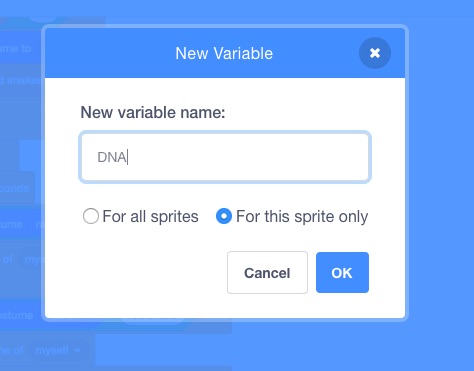
Make sure to set the DNA variable to an initial value when you start the game. I am going to use the value “large” and “small” to represent the DNA for each sprite. Initially, my DNA=”large”
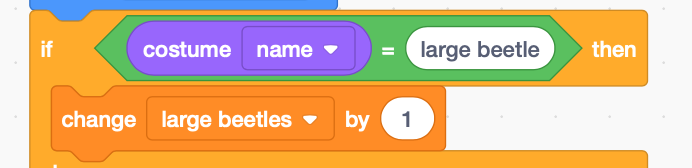
In our current code, the code checks for the costume when it starts as a clone. How would you change the code below, so that it will check the DNA variable when it starts as a clone? Don’t forget to set your costume, so the looks of the clones match the DNA of the clones.
Before:
After:
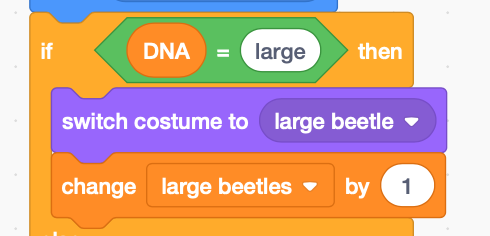
Great, now if you play the current version of the game, you will never see any small beetles ever. We are going to introduce small beetles into the population by “mutating” the DNA. We will do this by changing the DNA variable in random intervals.
In order to do this, we will use a special event called “broadcast”. Broadcast will tell every sprite in the game that it’s time to mutate their DNA. See if you can make the program broadcast a message “mutate!” every 5 seconds forever. Hint: you will use blocks such as When flag is clicked, Forever, Broadcast, and Wait.
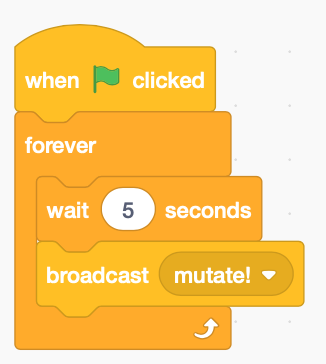
When you send a message, you expect there to be sprites that will receive the message. What will the sprites do when they receive the message “mutate!”? They will change their DNA variable to a different value. We will need to use the blocks like “When I receive message” and “If then else“, to check for the current state of the DNA variable and set it to an alternative.
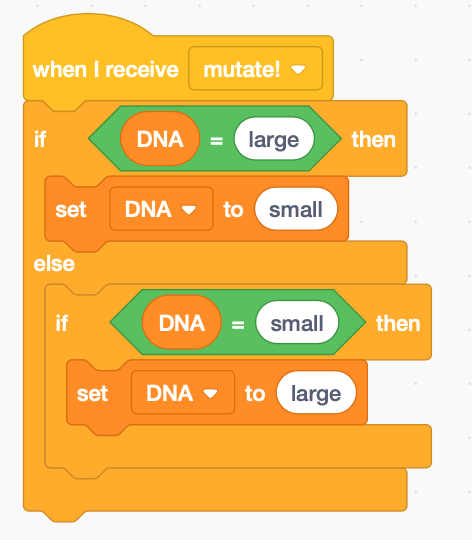
When the DNA variable is changed, the clones will change their color and size. Run your code, and wait to see if small beetles randomly appear in your screen. In Biology, the DNA that encodes the character of an organism is called the “genotype”. The character, for example, size of the beetle, that changes depending on the DNA is called the “phenotype”.
Now, we see that small beetles appear in our environment. But, in real nature, mutations don’t really happen every 5 seconds to everybody. In real nature, mutations are rare and random events. In order to keep our mutations rare and random, we will add one more control block before you switch your DNA. Each sprite will only switch their DNA one out of five times when they receive a message to mutate. How would you make that happen? Hint: use control block “If” with the operator block “pick random 1 to 5” as the condition, when you receive the message to mutate.
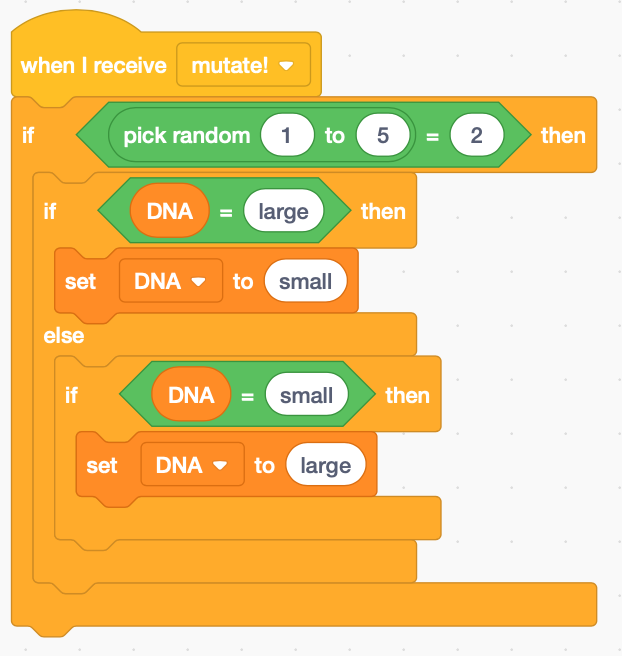
That wraps up our multi-day project on natural selection. Make sure you share your “Squish the bug” game.
- Click Share button on the top of the page.
- Click on +add to studio button at the bottom of the page
- Choose 2021 squish the bug!
- Click okay
Wrap-up: Show your project
- click on your account name at the top right of the page.
- Select My Class
- Click on Class Studios – 2021 squish the bug!
- Check out your friends projects!
